To connect a Linux router with strongSwan to a VPSnet private network over IPsec, add the site in the VPSnet control panel, then put its swanctl file in /etc/swanctl/conf.d, create the XFRM tunnel interface and the routes from the panel’s commands and load the configuration. The tunnel is route-based: traffic to the VPSnet networks is routed into the XFRM interface. Tested on Ubuntu 24.04.5 LTS with strongSwan 5.9.13 and a fixed public IPv4 address.
Before you start
- In the VPSnet control panel open your VPN, choose Connect a site (router), pick strongSwan and click Next. Enter the site’s networks and your router’s public address.
- Copy the pre-shared key right away: it is shown once.
- In the site’s configuration (tab CLI (copy-paste)) fill in Names on your router: Software version (5.9 or 6.x), XFRM interface id (a number no other tunnel on the router uses) and Tunnel interface name. Then download the .conf file of the connection.
The pictures show example values from documentation ranges. Enter the values from your own router recipe.
The pictures of this guide are terminal output from the test run, with the addresses, names and keys replaced by example values.
1. Install strongSwan and pick the names
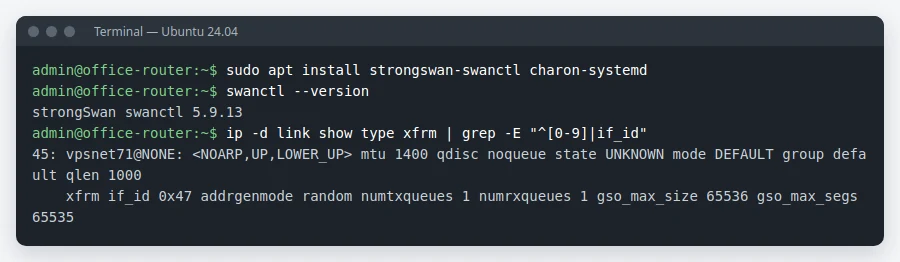
Terminal
On Ubuntu the packages are strongswan-swanctl and charon-systemd. Read the version and the XFRM interfaces already in use: pick an id and a name no other tunnel uses (here 27 and vpsnet27).
sudo apt install strongswan-swanctl charon-systemd
swanctl --version
ip -d link show type xfrm
2. Put the configuration file in place
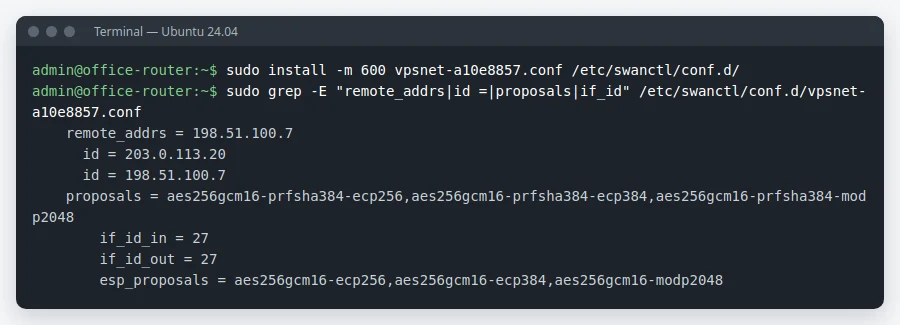
/etc/swanctl/conf.d/
Copy the downloaded file into /etc/swanctl/conf.d/, readable only by root: it holds the pre-shared key. It carries the connection with its proposals and the XFRM id you chose.
sudo install -m 600 vpsnet-a10e8857.conf /etc/swanctl/conf.d/
3. Create the tunnel interface and routes
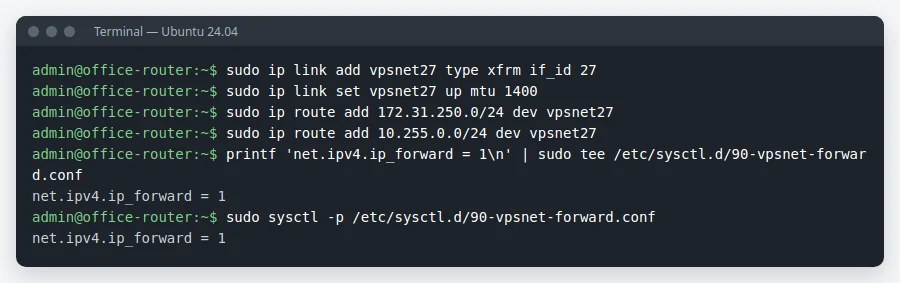
ip link / ip route
Run the panel’s Commands step: it creates the XFRM interface with MTU 1400, routes the VPSnet networks into it and keeps IP forwarding on. The interface and routes do not survive a reboot: add them to your network configuration or a startup script. When the VPN’s internet exit is on, the panel adds three more lines (ip rule, table) that send the office’s internet traffic through the VPN.
sudo ip link add vpsnet27 type xfrm if_id 27
sudo ip link set vpsnet27 up mtu 1400
sudo ip route add 172.31.250.0/24 dev vpsnet27
sudo ip route add 10.255.0.0/24 dev vpsnet27
printf 'net.ipv4.ip_forward = 1\n' | sudo tee /etc/sysctl.d/90-vpsnet-forward.conf
sudo sysctl -p /etc/sysctl.d/90-vpsnet-forward.conf
4. Load the configuration

swanctl --load-all
swanctl --load-all reads /etc/swanctl/swanctl.conf and everything in conf.d. If the router has other strongSwan connections, make sure all of them are in those files before you run it.
sudo swanctl --load-all
5. Check the tunnel
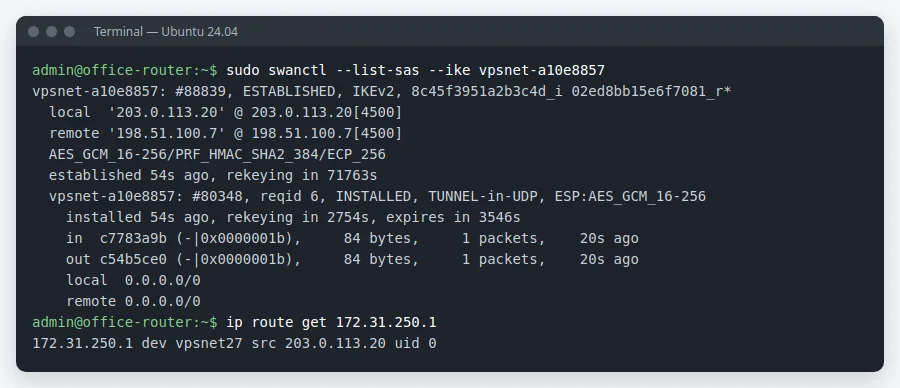
swanctl --list-sas
Our VPN starts the tunnel within a minute: the connection shows ESTABLISHED with an INSTALLED child, and the route to a VPSnet network goes through the tunnel interface. Then ping a VPSnet server from an office computer.
sudo swanctl --list-sas --ike vpsnet-a10e8857
ip route get 172.31.250.1
Check and troubleshoot
- In the panel, open the site and click Test tunnel: it checks that the router answers, the keys match and traffic passes.
- No SA: check that UDP 500 and 4500 from the VPN address reach the router, the remote_addrs line and the key. journalctl -u strongswan shows why a negotiation fails.
- Established but no ping: check that the routes go to the tunnel interface, that its if_id matches the file and that IP forwarding is on.
FAQ
Which strongSwan versions does this guide cover?
It was set up and tested on Ubuntu 24.04.5 LTS with strongSwan 5.9.13 (swanctl, charon-systemd) and a fixed public IPv4 address. For strongSwan 6 choose 6.x as Software version: the panel prepares the file for the version you choose.
Why an XFRM interface?
The VPN sends traffic by routes. With a tunnel interface you add or remove VPSnet networks by changing routes only.
I use Libreswan. Is there a guide?
Not step by step yet. Choose Libreswan in the panel: it gives a ready configuration for it, also shown in “How to connect” on the private networks page.
My router’s public address changes. Can I still connect?
This guide covers a fixed address, the case we tested. Tick “The address changes” when you add the site: the configuration then shows the settings for that case, and your router has to start the tunnel itself.
I lost the pre-shared key. What now?
The key is shown once. In the panel, open the site and choose “Rotate key”: a new key is made and shown once, and the old one stops working the next time the router connects.
Do I need NAT for the tunnel?
No. The VPSnet servers see the office computers’ own addresses.