To connect pfSense to a VPSnet private network, add the site in the VPSnet control panel, then set up a routed IPsec IKEv2 tunnel (VTI) on pfSense with the values from the panel’s router recipe: phase 1, phase 2, the tunnel interface, a route and a firewall rule. This guide was tested on pfSense CE 2.8.1 with a fixed public IPv4 address.
Before you start
- In the VPSnet control panel open your VPN, choose Connect a site (router), pick pfSense, choose IPsec IKEv2 under Connect over and click Next. Enter the site’s networks and your router’s public IPv4 address.
- Copy the pre-shared key right away: it is shown once.
- Keep the site’s Router recipe open, tab In the browser: it has your VPN address, tunnel addresses and networks filled in.
The pictures show example values from documentation ranges. Enter the values from your own router recipe.
1. Phase 1 settings
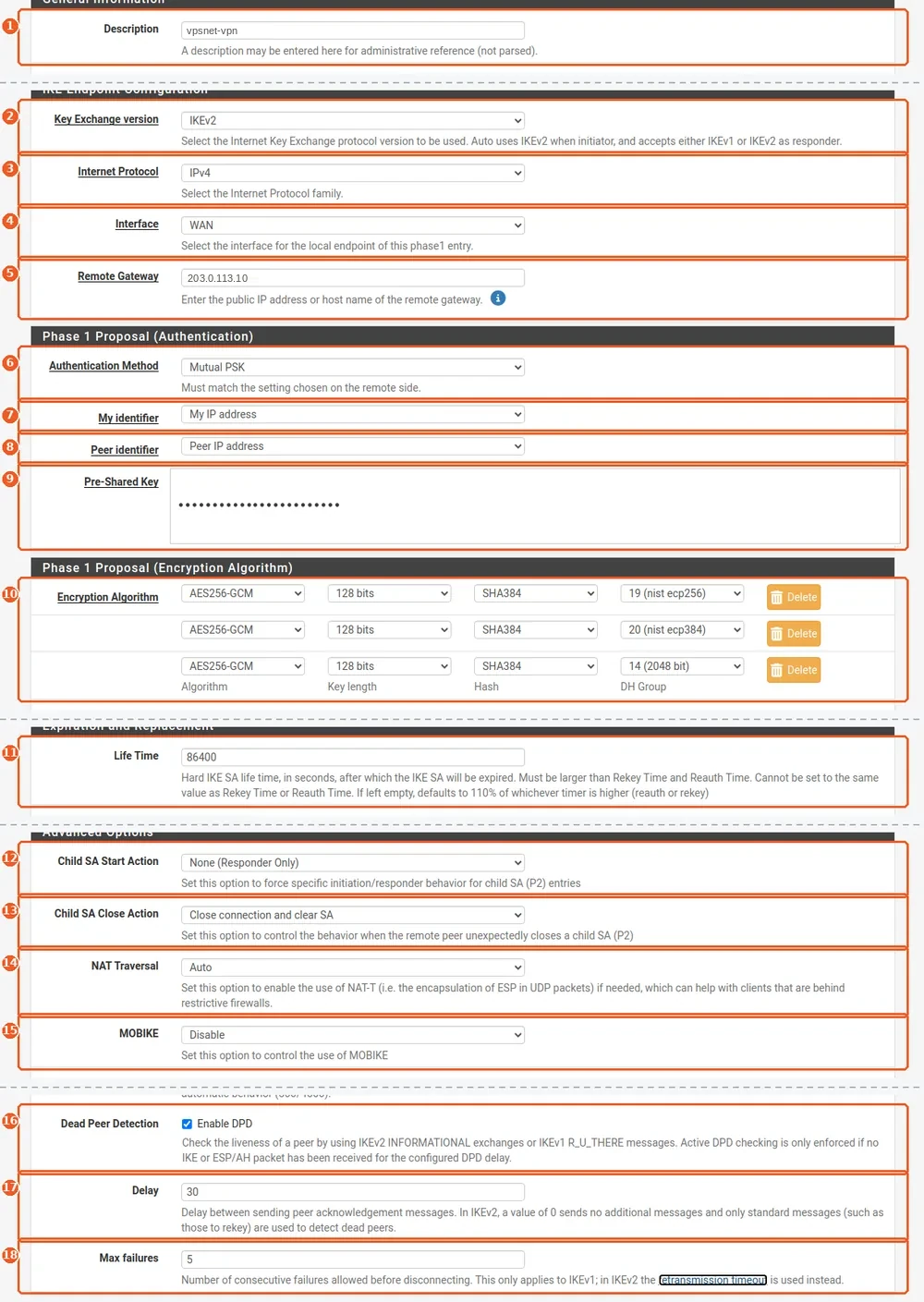
VPN > IPsec > Tunnels > Add P1
Click Add P1, then Display Advanced so that every option shows. Fill in the fields and click Save.
| # | Field | Value |
|---|---|---|
| 1 | Description | the tunnel name from the router recipe |
| 2 | Key Exchange version | IKEv2 |
| 3 | Internet Protocol | IPv4 |
| 4 | Interface | WAN |
| 5 | Remote Gateway | the VPN address from the router recipe |
| 6 | Authentication Method | Mutual PSK |
| 7 | My identifier | My IP address |
| 8 | Peer identifier | Peer IP address |
| 9 | Pre-Shared Key | the pre-shared key (shown once) |
| 10 | Encryption Algorithm | AES256-GCM, 128 bits, SHA384, DH group 19; with Add Algorithm two more rows: the same with DH 20 and DH 14 |
| 11 | Life Time | 86400 (or the value in the recipe) |
| 12 | Child SA Start Action | None (Responder Only): our VPN starts the tunnel and keeps it up |
| 13 | Child SA Close Action | Close connection and clear SA |
| 14 | NAT Traversal | Auto |
| 15 | MOBIKE | Disable |
| 16 | Dead Peer Detection | Enable DPD |
| 17 | Delay | 30 (or the value in the recipe) |
| 18 | Max failures | 5 |
2. Phase 2 settings (routed VTI)
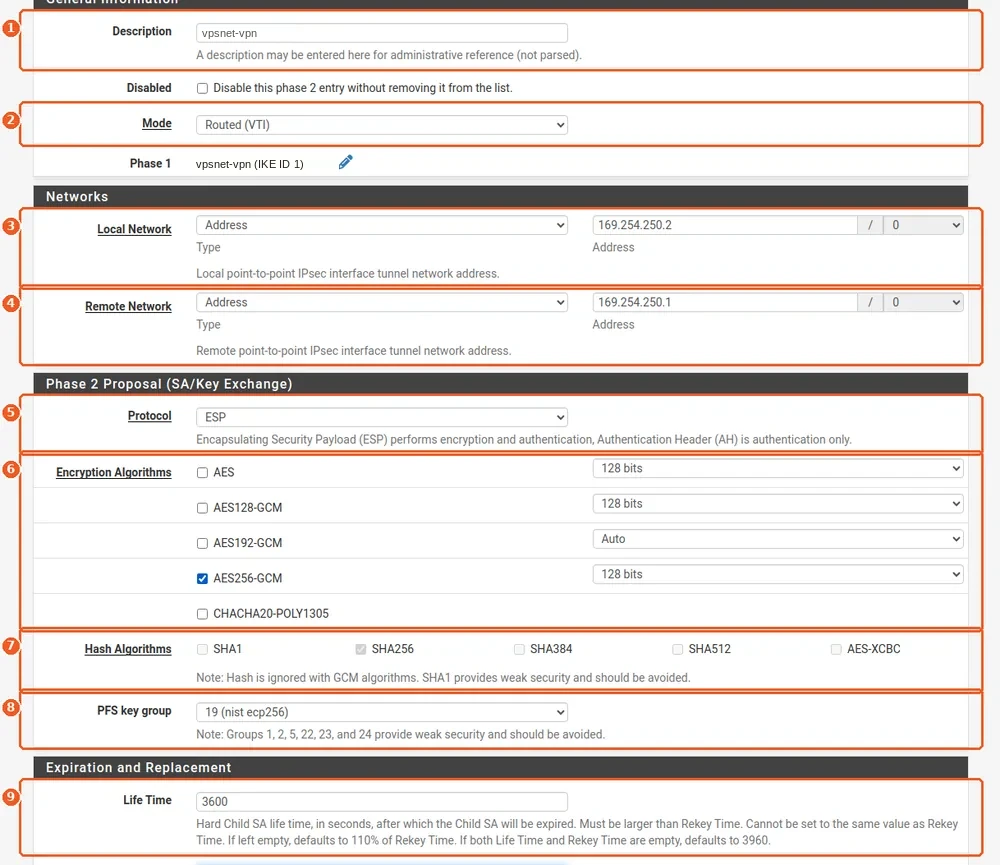
VPN > IPsec > Tunnels > Show Phase 2 Entries > Add P2
On the saved phase 1 row click Show Phase 2 Entries, then Add P2. Save, then click Apply Changes on the tunnel list.
| # | Field | Value |
|---|---|---|
| 1 | Description | the tunnel name from the router recipe |
| 2 | Mode | Routed (VTI) |
| 3 | Local Network | the router’s tunnel address from the recipe (169.254.x.x) |
| 4 | Remote Network | the VPN’s tunnel address from the recipe (169.254.x.x) |
| 5 | Protocol | ESP |
| 6 | Encryption Algorithms | only AES256-GCM, 128 bits: untick AES128-GCM and every other cipher |
| 7 | Hash Algorithms | none (greyed out with AES-GCM) |
| 8 | PFS key group | 19 (nist ecp256) |
| 9 | Life Time | 3600 (or the value in the recipe) |
3. Assign the tunnel interface

Interfaces > Assignments
Choose the new IPsec VTI under Available network ports and click Add. Note the name pfSense gives it (LAN, OPT1 or another).
| # | Field | Value |
|---|---|---|
| 1 | Available network ports | IPsec VTI with the tunnel name |
4. Enable the tunnel interface
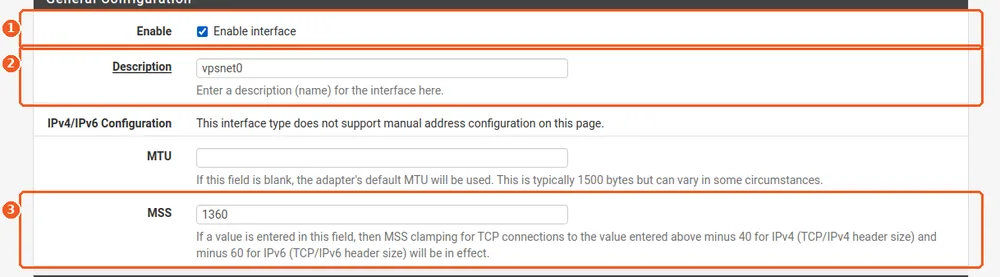
Interfaces > [the new interface]
Open the interface you just assigned and check that its network port is the new IPsec VTI, not WAN or an office LAN. Save, then Apply Changes.
| # | Field | Value |
|---|---|---|
| 1 | Enable | On |
| 2 | Description | the interface name from the recipe, for example vpsnet0 |
| 3 | MSS | 1360 |
5. Find the tunnel gateway

System > Routing > Gateways
pfSense creates the gateway by itself when the interface is assigned, for example VPSNET0_VTIV4. Note its name.
| # | Field | Value |
|---|---|---|
| 1 | Name | the gateway pfSense created |
6. Turn off gateway monitoring

System > Routing > Gateways > Edit
Edit the gateway: our VPN does not answer ping on its tunnel address, so monitoring would mark it as down. Save and apply.
| # | Field | Value |
|---|---|---|
| 1 | Disable Gateway Monitoring | On |
7. Route the VPSnet networks
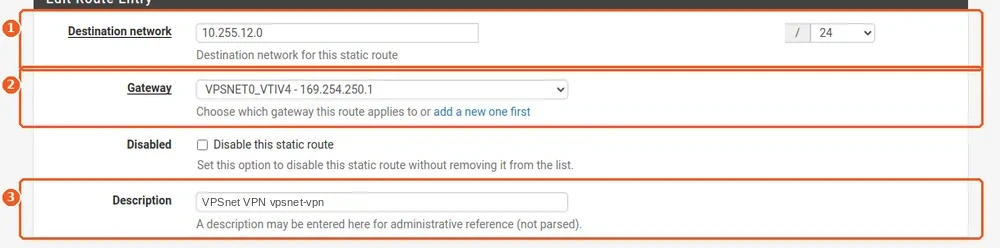
System > Routing > Static Routes > Add
Add one route for each VPSnet network in the recipe. Save and apply.
| # | Field | Value |
|---|---|---|
| 1 | Destination network | a VPSnet network from the recipe |
| 2 | Gateway | the tunnel gateway |
| 3 | Description | VPSnet VPN |
8. Allow traffic from VPSnet to the office
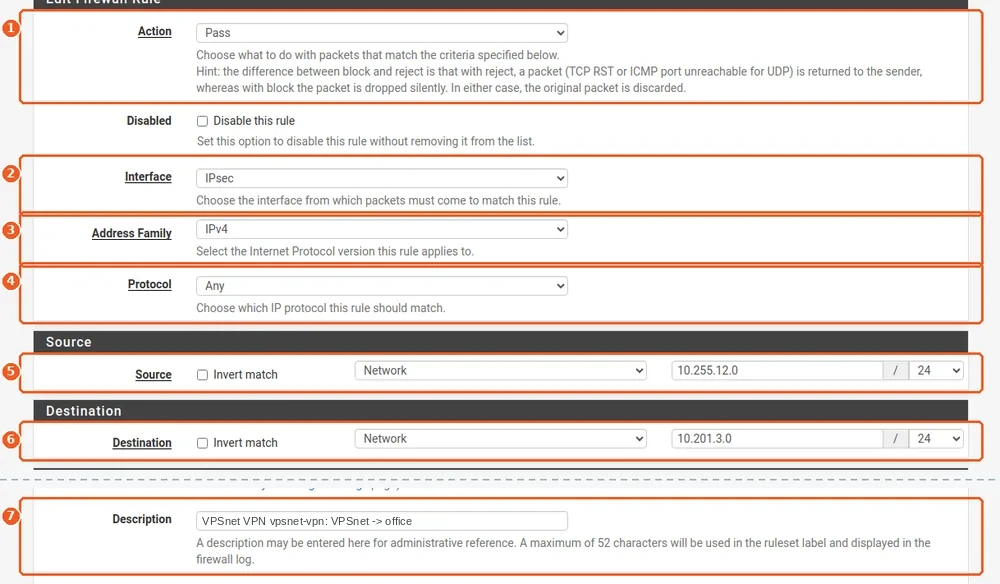
Firewall > Rules > IPsec > Add
This rule lets the VPSnet servers reach the office. One rule per office network. Traffic from the office to VPSnet must be allowed on the interface it comes in by: a default LAN rule covers it only when it comes in through LAN.
| # | Field | Value |
|---|---|---|
| 1 | Action | Pass |
| 2 | Interface | IPsec |
| 3 | Address Family | IPv4 |
| 4 | Protocol | Any |
| 5 | Source | a VPSnet network from the recipe |
| 6 | Destination | your office network |
| 7 | Description | VPSnet VPN: VPSnet -> office |
9. Check the tunnel

Status > IPsec > Overview
Our VPN starts the tunnel. The row shows Established, with the child SA installed. Then ping a VPSnet server’s private address from an office computer.
| # | Field | Value |
|---|---|---|
| 1 | Status | Established |
Check and troubleshoot
- In the panel, open the site and click Test tunnel: it checks that the router answers, the keys match and traffic passes.
- The tunnel does not come up: check Remote Gateway (the VPN address) and the pre-shared key, pasted without spaces. Status > System Logs > IPsec says why a negotiation fails.
- The tunnel is up but there is no ping: check the static route, that gateway monitoring is off and the Pass rule on the IPsec tab.
FAQ
Which pfSense CE versions does this guide cover?
It was set up and tested on pfSense CE 2.8.1 with a fixed public IPv4 address. Other versions may name or place some fields differently.
My router’s public address changes. Can I still connect?
This guide covers a fixed address. Tick “The address changes” when you add the site: the router recipe then shows the settings for that case, and your router has to start the tunnel itself.
Why a route-based (VTI) tunnel?
The VPN sends traffic by routes. With a tunnel interface you add or remove VPSnet networks by changing routes only.
I lost the pre-shared key. What now?
The key is shown once. In the panel, open the site and choose “Rotate key”: a new key is made and shown once, and the old one stops working the next time the router connects.
Do I need NAT for the tunnel?
No. The VPSnet servers see the office computers’ own addresses.